A practical SEO plan for small businesses: what to do in the first 30, 60 and 90 days, how much time it takes, DIY versus hiring help and how to measure results.
Running a small business means doing a dozen jobs at once, so SEO often lands at the bottom of the list. Yet search is where many of your future customers begin. They type a question, scan the first few results and contact one of them. If you aren’t there, you don’t even get considered.
The good news is that small businesses don’t need a huge budget or a big team to benefit from SEO. They need a clear order of priorities and steady effort. This guide gives you a practical 90-day plan, explains how much time and money to expect, helps you decide between doing it yourself and hiring help, and shows how to measure whether it is working.
Why SEO suits small businesses
Paid advertising stops delivering the moment you stop paying. SEO works differently: the pages, profiles and reviews you build keep working for you. For a small business, that means a lower cost per customer over time and visibility that doesn’t depend on a daily budget. It also levels the field, because you can compete with larger companies by being more specific, more local and more helpful.
If you are new to the topic, start with our guide on what SEO is and how it works.
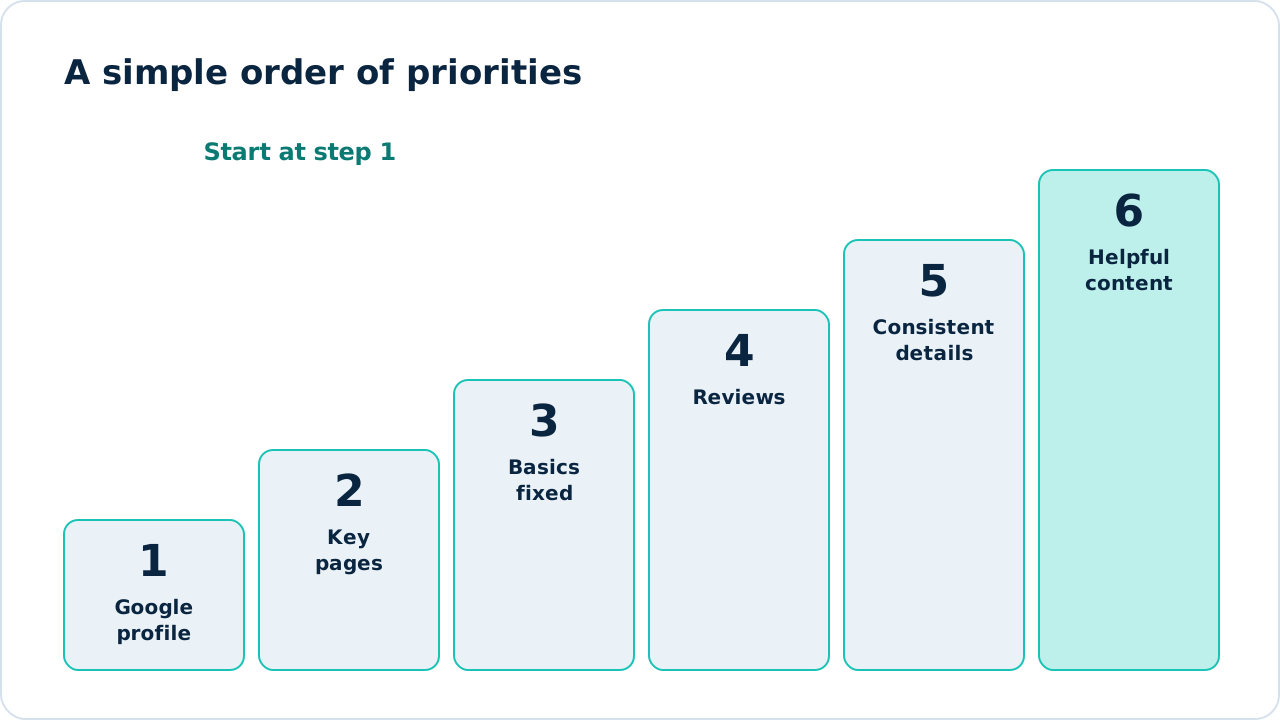
Figure 1: Start at step 1 and work upward. Each step builds on the one before.
Before you start: set goals and a baseline
Decide what success means. For most small businesses it is more phone calls, enquiries or bookings, not “more traffic”. Write down your starting numbers so you can measure progress:
- Monthly calls and form enquiries from the website.
- Visits from Google (from Google Analytics).
- Clicks and impressions (from Search Console).
- Reviews and rating on your Google profile.
Set up Google Search Console now. Our Search Console guide shows how.
Days 1 to 30: build the foundation
Claim and complete your Google Business Profile
If customers find you by location, this is the highest-value step. Claim and verify your profile, choose accurate categories, add services, hours, photos and a clear description. Our Google Business Profile guide walks through every field, and Google’s Business Profile help explains the options.
Figure 2: Your Business Profile dashboard. Replace with a screenshot of your own profile.
Make sure each core service has a page
You need a clear page for each main service, answering what you do, where you work, what it costs or how pricing works, and how to get in touch. Use the words your customers use, found through simple keyword research.
Fix the basics
- Make the site load quickly and work well on phones. See Core Web Vitals explained.
- Give every page a unique title and description.
- Put your phone number and a clear call to action where visitors can see them.
- Confirm your important pages are indexed using our five quick checks.
Days 31 to 60: build trust and reach
Start collecting reviews
Ask every satisfied customer, using a direct link. A steady trickle looks natural and helps both rankings and conversions. See how to get more Google reviews.
Clean up your listings
Use the same business name, address and phone number everywhere. Claim the main directories and fix duplicates. Our guide to local citations covers it step by step.
Publish your first helpful content
Answer the questions customers ask most often, one article or page at a time. A helpful page that answers a real question can bring in customers for years. Aim for quality over volume: one strong page a month beats five thin ones.
Days 61 to 90: grow and measure
Earn your first links
Ask suppliers, partners and local organisations to link to you. Sponsor a local event or contribute expert advice to a local publication. See how to get backlinks safely.
Improve what is nearly working
In Search Console, look for searches where you rank between roughly eighth and thirtieth place. Improve those pages with better content, clearer headings and more internal links.
Review your results
Compare your numbers with your baseline. Look at calls, enquiries, reviews, clicks and impressions. Decide what to do more of for the next 90 days.
How much time and money does it take?
Time and budget vary widely, but a rough guide helps planning.
| Approach | Time | Typical focus |
|---|---|---|
| Do it yourself | A few hours a week | Profile, reviews, one page or post a month |
| Part DIY, part expert help | A couple of hours a week plus a specialist | Technical fixes and strategy by experts, routine work in-house |
| Fully managed | Minimal | An agency handles the plan and reports to you |
Our plans start from $500 per month, and you can read more about how much SEO costs.
DIY or hire help?
You can handle the first 60 days yourself if you have the time. Consider help when:
- you lack the time to be consistent,
- your market is competitive,
- your website has technical problems you can’t solve,
- you want expert strategy and clear reporting.
If you hire an agency, ask what is included each month, how they report, how long the minimum commitment is and what happens if you leave. Avoid anyone who guarantees rankings.
What results to expect
Local improvements can start to show within weeks, while competitive searches take longer. Most small businesses see meaningful movement within three to six months of steady work. Read our guide on how long SEO takes for realistic timelines.
Common mistakes small businesses make
- Trying to do everything at once and finishing nothing.
- Ignoring the Google Business Profile.
- Using one page for all services.
- Buying cheap bulk packages or links.
- Judging results after a few weeks.
- Never asking for reviews.
- Measuring rankings instead of calls and sales.
Frequently asked questions
Is SEO worth it for a very small business?
Often yes, especially if customers search for what you offer. Start with the free, high-value steps: your Google profile, reviews and a clear page for each service.
How much should a small business spend on SEO?
It depends on your market and goals. Many begin with the free steps, then add professional help once they see the potential.
Do I need a blog?
Not necessarily. Start with strong service pages and a complete profile, then add helpful articles that answer real customer questions.
Can I do SEO without a website?
You can build visibility through your Google Business Profile and listings, but a website gives you more control and more ways to be found.
Next steps
If you’d like an expert view on what to do first, request a free SEO audit. We’ll review your site and send a short summary of your biggest opportunities.
Sources and further reading
- SEO Starter Guide: Google’s introduction to SEO.
- Google Business Profile Help: setting up and managing your profile.
- Google Search Console: free search performance data.
See how our SEO services work, or start with a free audit.
See our servicesFree SEO audit