A complete guide to getting more genuine Google reviews: build a review link, ask at the right moment, use ready-made scripts and respond to every review.
Think about the last time you chose a restaurant, a plumber or a dentist. You probably glanced at the star rating and read a few reviews before deciding. Your customers do exactly the same with your business. Reviews are social proof at the moment of decision, and they also influence how prominently you appear in local search.
This guide shows you how to build a simple, repeatable system for earning more genuine Google reviews. You will learn why reviews matter, how to create a review link, when and how to ask, ready-to-use scripts, how to respond to every review and the practices that break Google’s rules.
Why Google reviews matter
Reviews help in two ways.
For customers: the number of reviews, the average rating and recent comments influence whether someone contacts you. A business with many recent, detailed, positive reviews feels safer to choose.
For local rankings: Google lists high-quality, positive reviews among the things that can help a business rank better locally. You can read its advice in how to improve your local ranking. Reviews are one factor among several, alongside your profile completeness, relevance and distance, but they are one you can influence directly.
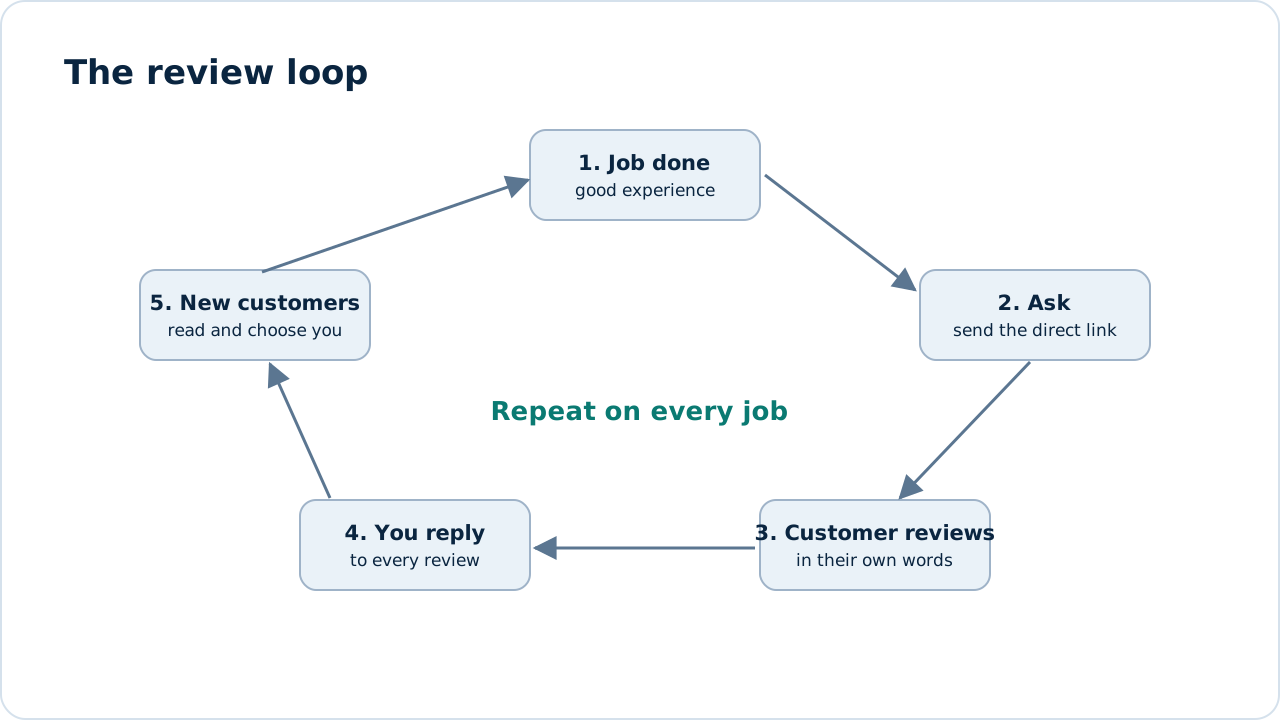
Figure 1: A review system works as a loop. Each good review helps bring the next customer.
Step 1: Create your review link
Make leaving a review as easy as one tap.
- Sign in to your Google Business Profile.
- Find the option to ask for reviews or share a review form.
- Copy the direct link.
- Shorten it with a link shortener if you like, and create a QR code from it for printed materials.
Figure 2: Your direct review link. Replace with a screenshot of your own profile.
Google updates the dashboard from time to time, so check your profile for the current wording and location of this option. The overall help for managing your profile is in Business Profile Help.
Step 2: Ask at the right moment
Timing matters more than most people expect. Ask when the experience is fresh and positive:
- right after a job is completed and the customer says thank you,
- at the end of a successful appointment,
- after delivery of a product, once it has arrived and works,
- after you solve a problem for them.
Waiting weeks lets the moment pass, so make asking part of your finishing routine.
Step 3: Make it easy
Every extra step loses reviewers. Remove friction:
- Send the direct link by text message or email, so one tap opens the review form.
- Keep the request to one or two sentences.
- Add the QR code to receipts, invoices, cards and the counter.
- Include the link in your email signature and after-sales messages.
- Tell customers it takes about a minute.
Step 4: Use simple scripts
You don’t need clever wording. Be sincere and specific. Here are templates to adapt.
Text message after a job
Hi [Name], thanks for choosing [Business] today. If we earned it, a quick Google review helps your neighbours find us: [link]. Thank you! [Technician name]
Email follow-up
Subject: How did we do?
Hi [Name], thank you for trusting us with [job]. If you were happy with the result, would you share a short review? It helps other people decide, and it means a lot to our small team. [link]
In person
“I’m glad that worked out. If you have a minute, a Google review really helps us. I can text you the link now.”
Avoid scripts that tell people what to write or push for five stars. Genuine opinions, including slightly critical ones, make your profile more believable.
Step 5: Build it into your routine
A system beats good intentions.
- Decide who is responsible for asking, and train everyone involved.
- Add a “review requested” step to your job or customer checklist.
- Set a target, for example three to five new reviews a week, and track it.
- Share good reviews with your team, so they see the benefit.
A steady stream of recent reviews looks more natural and works better than a burst followed by months of silence.
Step 6: Respond to every review
Replying shows future customers how you treat people. Do it promptly, politely and briefly.
Positive review reply
Thank you, [Name]! We’re glad [technician] could sort your [issue] so quickly. Call us any time.
Negative review reply
We’re sorry this wasn’t the experience we aim for, [Name]. Please call [manager] on [number] so we can put it right.
Guidelines for negative reviews:
- Stay calm and never argue in public.
- Apologise for the experience where fair, without admitting fault you don’t believe.
- Offer a way to resolve it offline.
- If a review breaks Google’s policies, such as spam, fake content or off-topic comments, use the option to report it, rather than replying with anger.
What not to do
Following the rules protects your profile. Do not:
- Buy reviews or pay someone to write them.
- Offer rewards such as discounts or gifts in exchange for reviews.
- Gate reviews by sending only happy customers to Google and unhappy ones elsewhere.
- Review your own business or ask friends and family who haven’t used your service.
- Pressure customers about the rating they give.
Violations can lead to reviews being removed or your profile being restricted.
How to use your reviews
- Read them for patterns, since they show what customers love and what to fix.
- Share standout reviews, with permission, on your website and social channels.
- Mention praised details in your service pages, because they match the words real customers use.
- If you mark up reviews with structured data, follow Google’s current guidelines, and read our schema markup guide first.
Measuring your progress
Track these every month:
| Measure | Why it matters |
|---|---|
| Number of new reviews | Shows whether your system works |
| Average rating | Reflects service quality |
| Response rate | Shows engagement |
| Profile actions (calls, directions, website clicks) | Connects reviews to business results |
Compare against your baseline, and look at how many customers mention your reviews when they contact you.
Common mistakes
- Asking only once in a while.
- Forgetting to reply.
- Sending customers to the wrong link or a profile that isn’t yours.
- Making the process too long.
- Reacting emotionally to a bad review.
Frequently asked questions
How many Google reviews do I need?
There is no fixed number. Aim to match or exceed the leading competitors for your searches, with a steady flow of new ones.
Can I ask for reviews by email and text?
Yes, as long as you comply with local messaging and privacy laws and don’t spam people.
Can I remove a bad review?
Only if it violates Google’s policies. Otherwise, reply professionally and focus on collecting more genuine reviews.
Do reviews from customers in other countries count?
Reviews come from real customers who used your service, wherever they are. If you serve several markets, ask customers in each one.
How long do reviews take to appear?
Most appear quickly, though Google may hold some for checks.
Next steps
Reviews are one part of winning the map pack. Read our complete local SEO guide, learn about local citations and see our local SEO service. For an expert review of your profile, request a free SEO audit.
Sources and further reading
- Improve your local ranking on Google: Google’s advice on relevance, distance and prominence.
- Google Business Profile Help: managing your profile and reviews.
- SEO Starter Guide: Google’s introduction to SEO.
See how our SEO services work, or start with a free audit.
See our servicesFree SEO audit